
Devices and official downloads
- iPhone and iPad
- iOS or iPadOS 26.0 or later. Find CoolMeow: Split Expenses on the App Store.
- Android
- Android 10 or later. Find CoolMeow: Shared Expenses on Google Play.
- Other Apple devices
- The App Store lists Apple Watch with watchOS 26.0 or later, Apple Vision with visionOS 26.0 or later, and Macs with an M1 chip or later running macOS 26.0 or later.
- Developer
- Spawn Lau.
- Cross-platform sharing
- iPhone and Android members can join the same ledger. On iPhone, invitees can use the App Clip to join and record expenses before installing the full app. Shared records sync when you're signed in and online.
Free and Basic subscription: who needs a subscription
| Plan | What it covers |
|---|---|
| Free | Personal records, reports and search, plus free participation in shared ledgers by invitation, according to your role. |
| Basic subscription | Share and sync your own ledgers, restore synced records, and use your personal receipt recognition allowance. Invited members do not inherit your personal recognition allowance. |
The Basic subscription renews automatically. Check the App Store or Google Play purchase screen for current prices and renewal terms in your region.
If the store offers an introductory trial for your account, review its eligibility, renewal and cancellation terms before starting.
Invited members do not need their own Basic subscription. The shared ledger needs a ledger creator with an active Basic subscription. Collaborators can add records and manage their own entries, subject to the creator’s approval policy; viewers cannot edit. Personal receipt recognition requires the account using it to have its own active Basic subscription.
If the creator’s Basic subscription expires, cloud writes and shared editing are restricted. The creator can continue recording locally in the app, with changes waiting to sync after the subscription is restored. Existing records are not deleted because of membership expiry.
Free and Basic subscription are the current plans.
Read subscription and cancellation details or check account and membership help.
Where the data goes
Local-only ledgers are stored on your device. Ledgers with sharing or synchronization enabled also use cloud services; shared records and attachments become accessible to members with the relevant permissions.
Receipt recognition uses a cloud service. When you choose this feature, the image goes to the dedicated recognition endpoint. It returns a draft for you to review and save, and cannot write an expense directly into your ledger.
Account, purchase, diagnostic and usage information is also processed by the services described in the Privacy Policy. CoolMeow should not be described as an entirely offline or entirely on-device app.
Try the built-in example ledger
New installations include Example ledger · Weekend trip. Open it to see five expenses alongside photos and notes. The three travelers spent CNY 1,164, so each person's share is CNY 388.
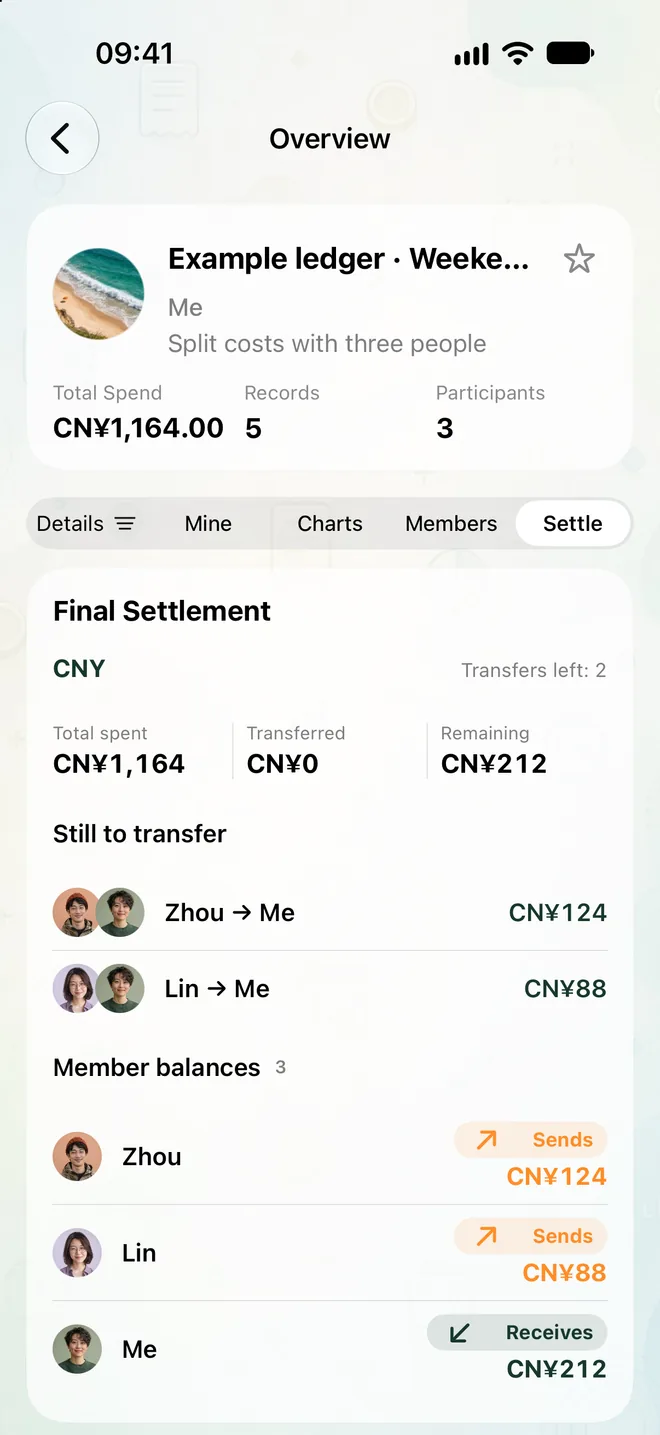
The 46-second recording follows an invitation, a receipt draft, an entry synchronized between iPhone and Android, and a suggested split. It uses sample data, with waiting time edited out.
Work through the USD 412 trip example to check the arithmetic and trace each share to the original expenses. The six expenses are available as CSV.
When CoolMeow fits your group
It suits groups that want expenses, photos and notes together, with a record everyone can review. It can also help explain a chart total by opening the expenses behind it.
Check another approach if you need bank-linked budgeting, automatic money transfers, or an app for an iPhone running a version below iOS 26. Free members can participate in an invited ledger. Enabling sharing or cloud sync for their own ledgers requires their own Basic subscription.
Receipt drafts can contain mistakes. Check the amount, currency, payer and selected participants before relying on a chart or settlement.
Choose a shared expense app for your group or follow a practical guide.
Connect a cloud ledger to an AI client
Through MCP, a compatible client can query and update the cloud ledgers you authorize. Your account role, the creator’s membership and the book’s approval policy still apply. Writes require a preview; confirmation behavior depends on the client’s tool settings.
MCP does not access local-only ledgers, buy memberships, move money, or use the app’s receipt-recognition allowance. Returned records and receipt attachments may enter the external AI client’s context or history, under that provider’s policies.
Manual remote MCP setup is available separately from the OpenAI plugin, which has no public install link yet. See the setup guide, permissions and limits.
Contact the maker
CoolMeow is made and maintained by Spawn Lau. For a problem with an invitation, purchase or record, use the Help center or email [email protected]. Include the platform and app version, and use fictional or redacted examples when possible.